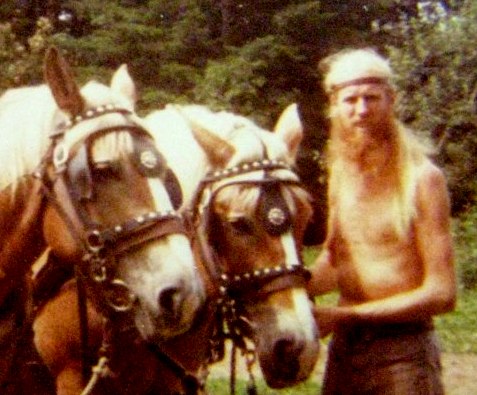
This site is dedicated to the memory of Jay Boquist, brother, friend, and father who left us way too soon. Jay loved the Belgians and was an inspiration to many.
This site is dedicated to the memory of Jay Boquist, brother, friend, and father who left us way too soon. Jay loved the Belgians and was an inspiration to many.
This chapter will deal with my time with the Belgians and the ranch logging operation. Time wise, it begins with the arrival of frankness at the ranch (shortly after the cabin burning down at the Alaska homestead), and continues for a year or so. As far as I’m concerned, this was the golden age of the Belgians at the ranch. There might be a few errors in the order of events, but I don’t see it mattering all that much.
Shortly after getting back from Alaska, Bezaliel (sp, BZ from here on out), arrived one morning at the ranch. He quickly established himself (within minutes) as a master of everything mechanical. BZ was instrumental in so many endeavors to be named. With the arrival of Frankness, it wasn’t long before a used saw mill had been located and a deal made. With the drive of Frank and assistance of BZ, it wasn’t long before the saw mill was up and running. Next, came the need for logs. As I remember, the horse logging began in earnest with the plan to build all the platforms by the lake.
Regardless of historical timing, the horse logging began when Frank and his crew began logging on the mountain behind the house. As we all remember, there was the main road which went from the barnyard and wound its way up to a small lake/pond. About a hundred yards up this road, another logging road took off up the hill to the left. A short ways up this road and the terrain leveled out into a forest that contained lots of usable trees. It became obvious that most logs would require a two part operation to get them down to the log loading ramp Frank had built in the barnyard. First, after the trees had been felled, limbed, and cut into sections (mostly sixteen feet), we would need to hook onto the log with a choker cable and snake it out to the logging road. This was usually a short distance. Then began the much longer move down to the barnyard. I built a small sled that we could put the front of the log on, making it much easier for the horse(s) to pull and much less destructive to the road.
At this time began one of my favorite partnerships with the horses. Paul Sherman (now I’ve dropped family names) wanted to help me with the horse operation. He became my complete right hand, and in the process became a very capable wrangler. We started the logging with Blonde since she was our most experienced and biggest horse. We would walk her up the road, towing the empty sled, which was a long, slow, uphill walk, then when arriving near the log to be moved, unhook the sled and hook up the choker cable. We would slip into the woods, hook up to the log and let Blonde step into action. She never balked, always stepped into her task and with ease (most of the time), would drag the log out to the road. Paul and I would then roll the front of the log onto the sled with a peeve (a four foot long pole with a spike on the end and a spiked hook used to jab into a log and with the hook dug into the side of the log, you could easily roll it) and chain it fast. Then Blonde would take the downhill stroll to the ramp, where we would unchain it and roll it onto the ramp. Once the ramp was full, we would load the logs onto a horse drawn wagon and take to load over to the mill.
While doing this operation, I let Paul share in the driving, although I think I did most of it. Within a short time, we decided to bring Sunday into the mix. I built a second sled and turned Blonde over to Paul (who had become totally proficient) while I focused on training Sunday to begin pulling heavier loads than she was used to. She took to the job with no hesitation and was delightful to work with. In short order we had a very productive flow going. Also, at some point (again, my memory on timing is a bit dim), Rob Sherman got involved in the mix and joined Paul and myself as an official horse logger. Since we were running two operations, the logging crew helped us with all the hooking up to logs, etc. Once we had both horses pulling well, we began yarding out larger diameter logs, using Blonde and Sunday as a team. It was just awesome to feel their power and willingness to do the work. They really enjoyed the work because every morning, they would be waiting at the gate to begin the day.
This was all hard work and we did it day in, day out for what seems like several months (although logging was something we did for several years). What amazes me now, looking back was how much energy we all had. We would do this all day, as well as feeding/milking animals twice a day, then play basketball upstairs in the barn in the evenings. Whew!!!!!!!! When new arrivals showed up from town, they would be completely exhausted after working with us for a day.
All this work was very dangerous. Absolutely the most dangerous work I have ever done. While snaking the logs over uneven ground through the trees out to the road, one had to in many instances jump from one side of the log to the other while horse and log were in full motion. We made it through all of this with a minimum of bumps and bruises, with broken bones being a constant possibility.
Here is a little Blonde story involving logging…….. One day I decided to take her to the back of the lake (kind of out past Doug Hancock’s place). This was before anyone had moved from the circle at the lake. For some reason (as it turned out, not the brightest idea), it was just myself and Blonde. The logs were out in the wood and needed to be snaked out to the road. I was using a long cable/choker because the logs were deep in some trees. I went back and hooked the choker to the log and stretched out the cable to where I wanted Blonde to pull from. So, I’m backing her up to where I want her and I trip and fall into this depression in the ground. I’m lying flat out on my back and Blonde backs up right over me so that I’m staring up at her belly. She didn’t so much as touch me with a hoof. To this day, I think she knew exactly where I was and avoided stepping on me. She stopped on her own and I rolled out from under her and kissed her on the nose for being so great. Then……….. I hooked Blonde to the cable and began pulling the log out. We were on a winding trail and it took a right turn with me on the right side of the cable. Since it was a long cable, it was about belly high on me. As we headed past this tree on the right, the cable moved closer and closer to the tree. Before I knew it, I was pinned against the tree by the cable with the pressure growing rapidly. I couldn’t move and the reins were pulled out of my hands because Blonde was still pulling away. I’m now feeling really fucked, having lost control of blonde, and having visions of being sliced in two. All I could do was yell “WHOA”, and just like that, Blonde stopped and even backed up a little. I was able to get out from my trap. At that point, I called it a day, unhooked Blonde, thanked her once again and returned to the barn. I’ve always thought if it had been any other horse, the results of that day could have been much worse. Thanks again Blonde.
Note: thanks to Paul and Rob Sherman for helping me with some memories. Sometimes I’m amazed at things that I remember and others I totally forget.